The more you use the computer, the more useless files are generated. They use up the computer space, making the computer slower.
You have to clear these useless files once in a while or the computer will become annoyingly slow. To do this, all you need is a computer cleaner. A computer cleaner cleans the computer from those useless files with only a few clicks.
There are a number of freeware computer cleaners that you can download. But here are the two best ones.
CCleaner

CCleaner is the most popular computer cleaner out there, and for a good reason. It can clean useless files from Windows, Firefox, Internet Explorer, Opera, and various other applications. The cleaner is also very customizable to suit your needs.
Besides that, it has three bonus features that you will appreciate.
CCleaner has a registry scanner that scans for registry issues and fix them. Fixing the registry is another way of increasing the computer's performance.
If you click "Tools", you will go to the uninstaller and startup manager. This uninstaller is a faster alternative to Windows's "Add or Remove Programs". The startup manager lets you decide which applications are allowed to be run at the startup, or as soon as the computer is turned on.
The third feature is maybe small and often unnoticed, but it can very useful at the right time. At the top, besides CCleaner's brush logo there are two lines of text. The first line tells about the computer's operating system. The second line states about the CPU, the memory, and the graphics card. This feature provides a quick way to find out the general information about your computer.
Go to CCleaner's Website
ATF Cleaner
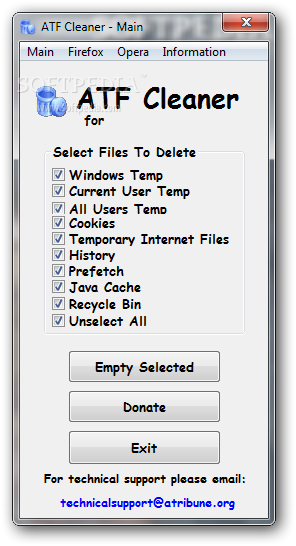
ATF Cleaner is a good alternative to CCleaner. ATF Cleaner is only 49.5 KB in size and doesn't require installation. It surely has less features because of the tiny size, but it works like a charm if all you want to do is clean your computer. It's worth to take a look at.
Download ATF Cleaner

1 comment:
Choosing the right PC cleaner can be quite a challenge, since there are numerous products available in the market right now. The key to selecting the right cleaning tool would be gathering as much information as possible. Although automatic OS detection has become relatively standard across the industry, manually checking the compatibility of a certain cleaning tool with your OS won't hurt.
Linus Soriano
Post a Comment