Microsoft Paint is already installed in Windows by default.
To open Paint, click the start button, go to All Programs, and then Accessories, and click Paint.
Open the image file that you want to convert using ONE of the following methods:
Method 1
In Paint, go to File, and click Open.
Method 2
This method is quicker. Right-click the file, go to Open With and click Paint.
When the image is opened in Paint, you can convert it to JPEG format by saving it in that new format.
Go to File and click Save As....
Under "File name:" there is "Save as type:". You can save the image in any format available by changing the "Save as type:"
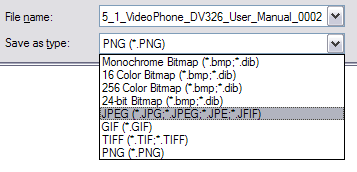
To change the format to JPEG, click the arrow and choose JPEG. Then save the file anywhere you like and it should be in the .jpeg format.

No comments:
Post a Comment